











Best POS System 2026: How to Choose the Right Terminal for Your Business
There is no single "best POS system": the right terminal depends on how much you process every month, what kind of business you run, and how tied you want to stay to the bank that provides it. A small retail shop with a handful of items has very different needs from a restaurant that has to connect table orders to the till, and a seasonal business weighs financial risk differently than a shop open all year round. This guide brings together, in one decision path, the three choices that really determine which POS system makes sense for you: bank or independent gateway, Android Smart terminal or classic POS, and renting or buying the hardware.
Best POS 2026: Quick Decision Matrix
| If your business... | Choose... | Why |
|---|---|---|
| Processes under €3,000/month | A low-fee rental POS | Minimal upfront investment, no risk of obsolete hardware |
| Processes over €10,000/month | A purchased POS with IC++ pricing | Hardware pays for itself within a few months, savings on fees over time |
| Needs an integrated till system | Android Smart POS | One single device for till, stock and payments |
| Wants to stay independent from its bank account | Independent gateway (RoxPay) | Any IBAN, transparent IC++ fees |
Indicative matrix based on the evaluation criteria RoxPay uses to recommend hardware and contract models to new merchants.
Bank or independent gateway: the first decision to make
The POS provided by the bank where you hold your business account remains the most common choice in Europe, but it is not automatically the cheapest one. A traditional bank POS ties your payouts to the account opened at that same bank and almost always applies opaque "blended" rates, which hide interchange, scheme fees and the bank's own margin inside a single percentage. An independent gateway like RoxPay instead pays out to any European IBAN you choose, with IC++ pricing that separates interchange, scheme fees and markup on every line of your statement.
This is the decision with the biggest financial impact, especially above €5,000 processed per month, where even a small gap between a blended rate and IC++ pricing turns into hundreds of euros a year. You will find the full comparison with real numbers in our bank POS vs independent gateway guide, which also shows how to keep your current account while only switching the terminal provider.
Android Smart POS or classic terminal: what your shop actually needs
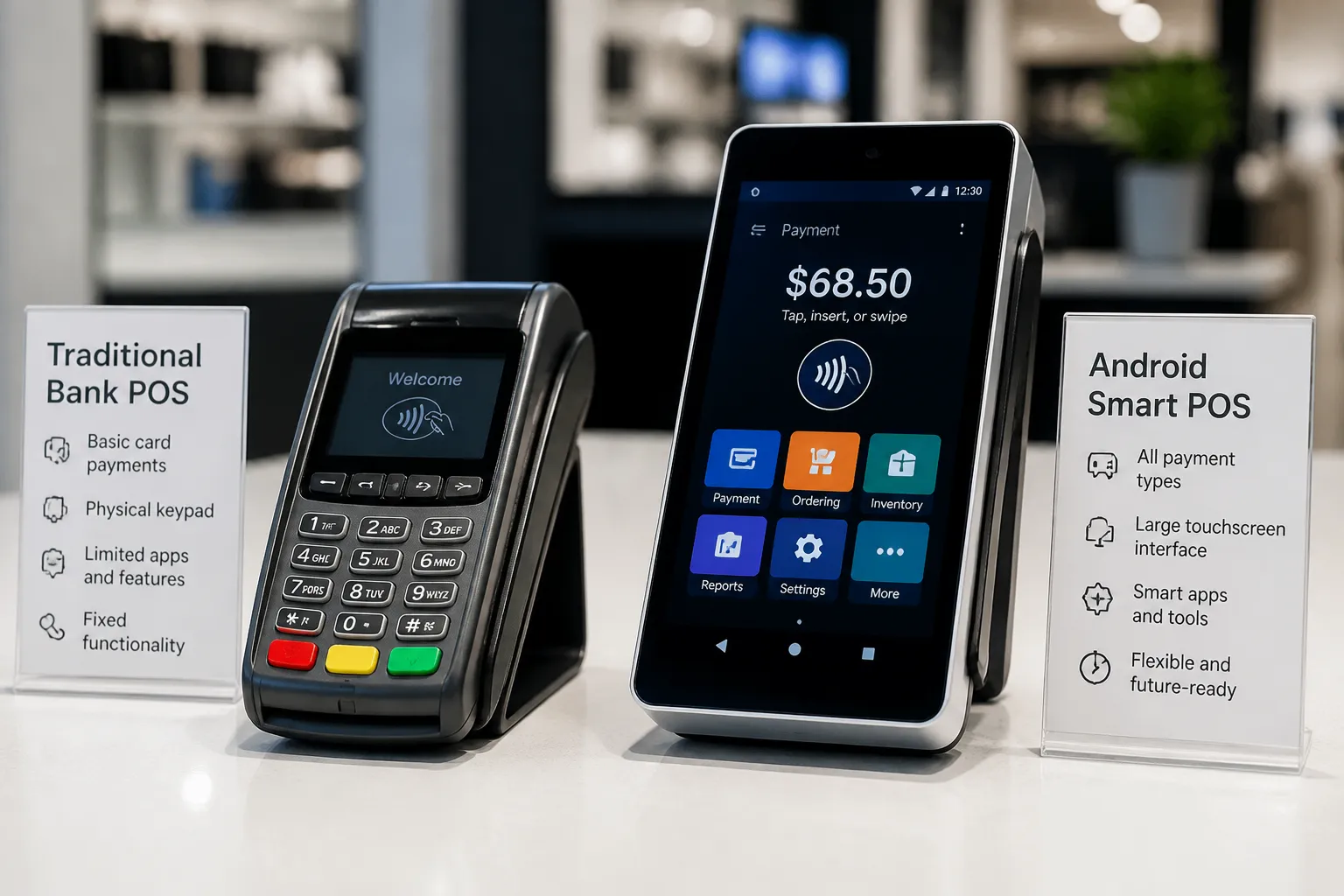
A classic POS terminal simply takes card and contactless payments, with no other functions. An Android Smart POS instead runs a full operating system: you can install your till software, print the fiscal receipt from the same device, and connect peripherals such as barcode scanners or kitchen printers, removing the need for two separate devices linked by cable or Bluetooth.
If you run a retail shop or a restaurant that needs to connect the till to payments, a Smart POS removes the double entry between a separate cash register and card terminal, also cutting the risk of end-of-day reconciliation errors. If instead you run a very simple business with just a few items or services, for example a professional who takes only a handful of payments a day, a classic terminal stays cheaper and is perfectly sufficient, without paying for features you will never use. Our guide to choosing the best Android Smart POS goes deeper into the features worth checking before moving to an integrated device.
Renting or buying: which one pays off depending on your volume
Classic rental costs around €25 a month on average and requires no upfront investment, but over a 5-year contract you end up paying roughly €1,500 in fees alone, plus penalties if you cancel early. Buying an Android Smart POS costs roughly €300-800 as a one-off payment, with a break-even point against renting at around 40 months: after that point, every extra month of use is a net saving compared with the rental fee you would otherwise keep paying.
The right choice depends on how confident you are about the duration of your business in its current form: if you expect to operate for years with stable volumes, buying almost always pays off in the medium term, and modern Smart POS terminals typically come with a 2-year warranty and fast swap in case of a fault. If you are testing a new location or a temporary event, renting avoids tying up capital you might not recover in time. All the numbers behind this comparison, including a year-by-year breakdown, are in our POS rental vs purchase guide.
Final checklist before signing a POS contract
Before choosing a provider, check every cost item separately: monthly fee (if any), percentage or IC++ structure on each transaction, activation costs, contract length and any early termination penalties. An offer that looks cheap on the single percentage advertised can hide a multi-year commitment that makes it more expensive over time, a common mistake among people who only compare the advertised monthly cost without reading the full contract terms.
Common mistakes to avoid when choosing your POS
The first mistake is comparing two offers by looking only at the transaction percentage advertised on the homepage, without asking for a full cost breakdown: a low percentage can hide a high fixed fee or activation costs that were not mentioned upfront. The second mistake is signing a multi-year rental contract without checking the early termination penalty, only to discover later that switching provider before the end of the term costs more than the savings from moving to a better offer.
The third mistake, less obvious but just as costly, is choosing an Android Smart terminal only for its technology without checking whether the till software you use (or want to use) is actually compatible: a modern device that does not integrate with your stock management system still forces you to run two separate systems, cancelling out the main benefit of the integration.
Frequently Asked Questions
What is the best POS for a shop with few customers a month?
For volumes under €3,000 a month, a low-fee rental POS or a gateway with no fixed fee like RoxPay reduce the risk of an upfront investment you might not pay off quickly. Buying the hardware only pays off once volume is stable enough to reach break-even within a reasonable time.
Does an Android Smart POS cost more than a traditional POS?
The hardware for an Android Smart POS costs roughly €300-800, against lower prices for a classic terminal, but the advantage is functional: it brings till, stock and payments together in one device. Transaction fees are independent of the terminal type and depend instead on the provider you choose.
Can I switch POS provider without switching bank?
Yes. With an independent gateway like RoxPay you can keep the current account you prefer (any SEPA bank) and only change the provider that manages the terminal and the payment fees.
Does the same POS work for a physical shop and for online sales?
If you sell through both channels, a single gateway that covers both the physical terminal and the e-commerce integration avoids running two separate contracts with different providers and two fee statements to compare. Always check that the provider you choose actually offers both solutions under the same pricing model.
You might also like
High Risk Payment Gateway
Secure payment processing for high-risk industries with multi-acquirer routing and chargeback protection.
Small Business Payment Solutions
Transparent IC++ pricing, free Smart POS terminal, and 24-hour activation for small businesses.
E-commerce Payment Integrations
One-click plugins for WooCommerce, Magento, and PrestaShop with full API access.
Optimize your payments today
Discover the RoxPay POS for your business. No fixed monthly cost, transparent IC++ pricing. Contact us at /en/contact.
✓ No monthly fixed costs · ✓ Activation in 24 hours · ✓ Dedicated technical support